

Advanced Mapping Functions
Lytics supports numerous built-in functions for light data transformation and logic evaluation to allow users to map only data that is relevant to their customer profile and format it the way they need for activation of their use cases.
For more complex data transformation and aggregation we suggest utilizing Cloud Connect (with or without Lytics Warehouse) for bringing in calculated attributes.
Expressions
Mapping Keys vs. Literals
To map the data value passed in an event you will want to use the associated key within the Expression. When creating mappings it is important to remember that keys need to be wrapped in single backticks (``).
Literals (which can be a string, int, float, bool, or timestamp) are used to map a static value to the field. These are often used with conditionals.
Conditions
Conditions allow you perform logical evaluations to determine when to store a value on a field based on any of the data passed within the same incoming event.
Merge Operators Merge operators allow you to determine how a value will be written to a field in relation to the currently stored value.
Data Types Kind = "int" | "number" | "string" | "date" | "[]string" |
"ts[]string" | "map[string]int" | "map[string]number" | "map[string]string*
Screenshot Example of supplying expression / condition to a mapping
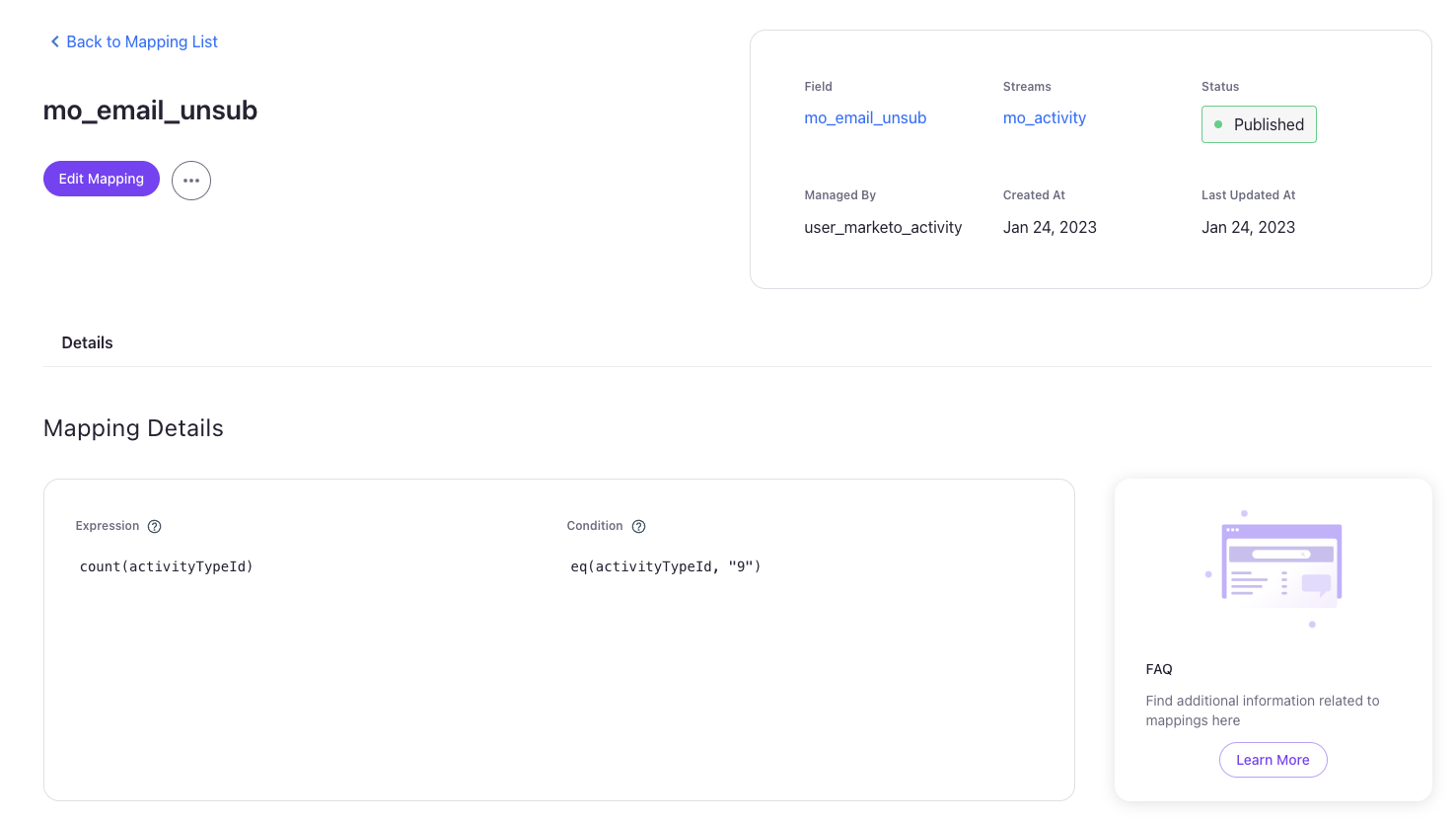
This example showcases the default mapping for the mo_email_unsub field from the Marketo Activity import. Here we see we are writing count over time in which we see activityTypeId as a key in the incoming event data. However, we are only writing this expressions results when that incoming event data evaluates the condition eq(activityTypeId, "9") as true.
Math Functions
These functions perform numeric calculations. Non-numeric input that cannot be coerced to a number results in no value being written.
sqrt
Returns the square root of a numeric value.
sqrt Example
{
	"page_views": 9,
	"_uid":"0123-4567-8901-2345-6789"
}sqrt(`page_views`)3pow
Raises a number to a power: pow(base, exponent).
pow Example
{
	"base_score": 5,
	"_uid":"0123-4567-8901-2345-6789"
}pow(`base_score`, 2)25String Functions
These functions are used to manipulate string fields.
join
Join together multiple values, coerce them into strings. Last argument is which string to use to join (may be empty string).
join Example
{
  "street":"698 Candlewood Lane",
  "city":"Cabot Cove",
  "state":"ME",
  "_uid":"0123-4567-8901-2345-6789"
}join(`street`,`city`,`state`,", ")698 Candlewood Lane, Cabot Cove, MEBreaking down the Example
The join() function takes at minimum 2 arguments (utilizing the LAST argument as the "joining" string), and concatenates each argument in order utilizing the "joining" string. In this example we produce a single string consisting of street, city, state values concatenated utilizing the "joining" string , (comma followed by a space).
len
Length (of array, string) find the length of a string, return integer value of length.
len Example
{
  "_e":"item_added_to_cart",
  "items_in_cart": [
    "ISBN_9780553119978",
    "ISBN_9780345324481"
  ],
  "_uid":"0123-4567-8901-2345-6789"
}len(`items_in_cart`)2Breaking down the Example
The len() function here is operating on a field whose value is an array, so the output is the number of items in the array. Applying len() to a string results in the character length of the string.
oneof
Choose value from the first field that has a non nil (empty string ""inclusive) value.
oneof Example
{
  "account_id":"000-000-001",
  "account_name":"Planet Express",
  "_uid":"0123-4567-8901-2345-6789"
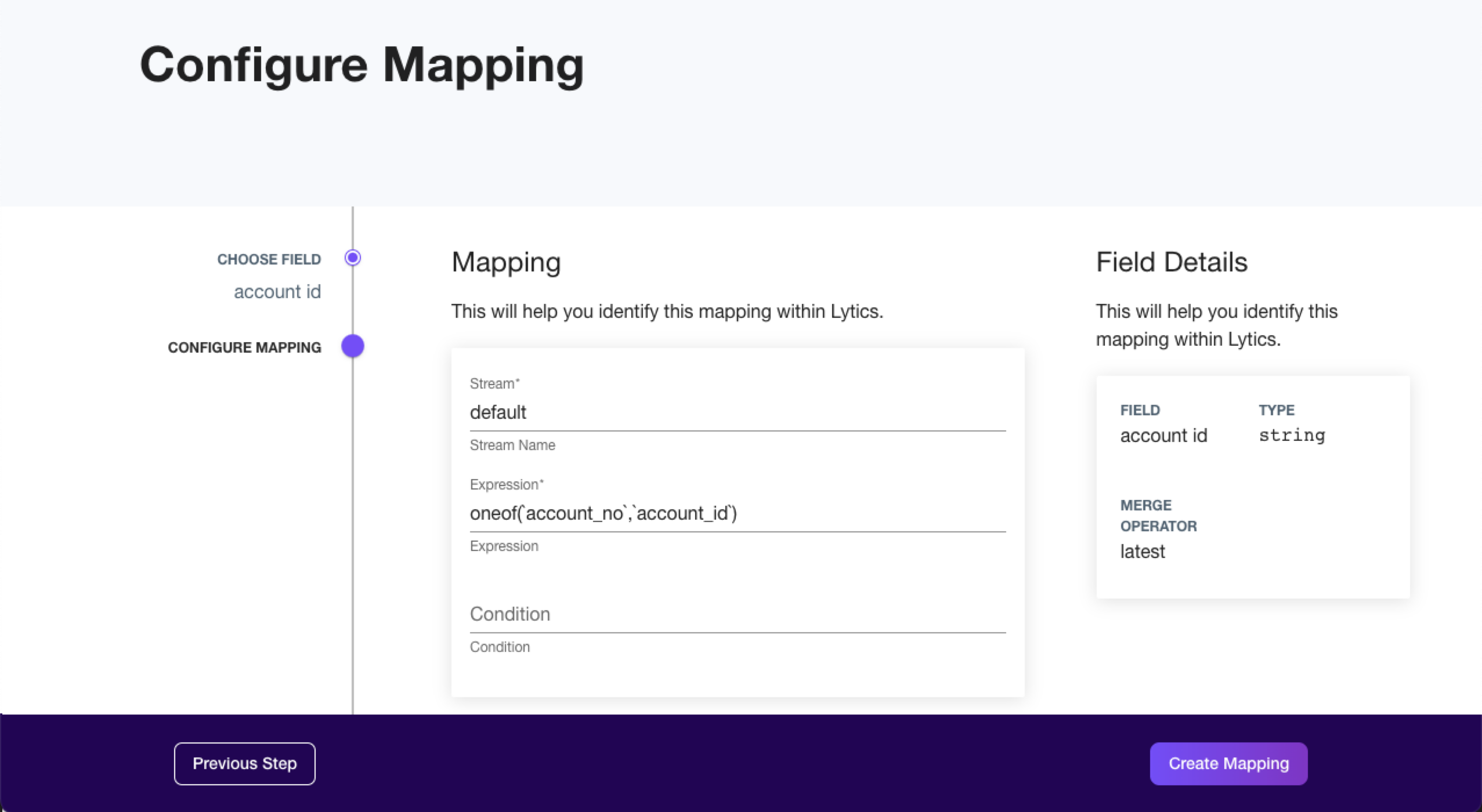
}oneof(`account_no`,`account_id`)000-000-001Breaking down the Example
This oneof() function first checks and sees that the account_no field does not exist in the event data, so then moves to the account_id which is found to be a non nil value and is returned.
replace
Converts the value to a string and then replaces the matching part of a string with another string. If no replacement string is passed or an empty string is passed the matched string is simply removed.
replace Example
{
  "_e":"search",
  "url":"https://pawneeindiana.com/parks-and-recreation",
  "_uid":"0123-4567-8901-2345-6789"
}replace( replace( path(`url`),"/"),"-", " ")parks and recreationBreaking down the Example
Using path finds the path of the url which is "/parks-and-recreation".
The inner replace finds all parts of the string that matches "/" and since there is no specified string replacement "/" is replaced with nothing. This results in a value of "parks-and-recreation"
The outer replace() takes the resulting "parks-and-recreation" and finds all of the parts of the string that matches "-" and replaces with a space (" "). Leading to the final value of "parks and recreation"
split
Breaks a variable into smaller fragments given a specific delimiter
split Example
{
 "_e":"preferences-set",
  "favorite-genres":"mystery|science fiction|fantasy",
  "_uid":"0123-4567-8901-2345-6789"
}set( split(`favorite-genres`, "|"))[
"fantasy",
"mystery",
"science fiction"
]Breaking down the Example
The split() splits the incoming value associated with the favorite-genres key at each of the "|" characters the value contains.
Because split() will split the value into fragments that are stored as an array, you will need to map it to a field that is a set data type ([]string or []time) and you will also want to wrap set() (for strings) or totimeset() (for datetimes) around the function.
The order of a set of strings resulting from the split function will be alphabetical. The order of a set of datetimes resulting from the split function will be oldest to latest. However, if you use an array.index function to pull out a value based on position, the originally passed order will be referenced.
strip
Strip removes leading and trailing whitespace (spaces, tabs, newline, carriage-return) from strings, or arrays of strings.
strip Example
{
  "_e":"preferences-set",
  "favorite-sub-genres":"detective fiction | cozy mystery | space opera | steampunk",
  "_uid":"0123-4567-8901-2345-6789"
}strip( split(`favorite-sub-genres`, "|"))[
"detective fiction",
"cozy mystery",
"space opera",
"steampunk"
]Breaking down the Example
The split() function splits the incoming value associated with the favorite-sub-genres key at each of the "|" characters the value contain. In this example it will create 4 strings that are stored in an array output alphabetical order.
The strip() function then removes the leading and trailing spaces around each of the strings within the array.
string.lowercase
Convert strings to lower case
string.lowercase Example
{
  "_e":"registration",
  "vehical_make":"DMC",
  "vehical_model":"DeLorean",
  "plate_number":"outatime",
  "_uid":"0123-4567-8901-2345-6789"
}string.lowercase(`vehical_make`)dmcBreaking down the Example
The string.lowercase() function looks at each character in the string value and converts to the lowercase equivalent.
string.uppercase
Convert strings to upper case
string.uppercase Example
{
  "_e":"registration",
  "vehical_make":"DMC",
  "vehical_model":"DeLorean",
  "plate_number":"outatime",
  "_uid":"0123-4567-8901-2345-6789"
}string.uppercase(`plate_number`)OUTATIMEBreaking down the Example
The string.uppercase() function looks at each character in the string value and converts to the uppercase equivalent.
string.titlecase
Convert strings to title case
string.titlecase Example
{
  "_e":"profile-completed",
  "full_name":"ARTHUR DENT",
  "_uid":"0123-4567-8901-2345-6789"
}string.titlecase( string.lowercase(`full_name`))Arthur DentUsing
string.titlecase()only operates on the first character of each "word" in the string, and thus will always require that you first convert the string to lowercase usingstring.lowercase()for the full traditional titlecase conversion.
Breaking down the Example
Using the string.lowercase() will first normalize the incoming string by converting it to lowercase.
Wrapping the string.titlecase() will then convert the string into title case.
string.index
Find position of substring within a string, return ordinal starting position.
string.index Example
{
	"numberString":"0123456789",
	"_uid":"0123-4567-8901-2345-6789"
}string.index(`numberString`, "1")1Breaking down the Example
string.index() utilizes a '0' based index, so the first character in the string is at index 0, and the "1" being the second character in the string is at index 1
string.substr
Extract a string from a string using positional start/end.
string.substr Example
{
	"numberString":"0123456789",
	"_uid":"0123-4567-8901-2345-6789"
}string.substr(`numberString`, 3, 7)3456Breaking down the Example
string.substr() utilizes a '0' based index and returns the substring of the provided string, starting at the provided start index up to but not including the end index. The end index is optional here, and will return from the start index through the remainder of the string.
string.substr("android",0,3) => "and"string.substr("android",2) => "droid"
contains
Does this value contain this string? Is a sub-string match, not full match (eq)
contains Example
{
	"stringExample":"This is a string being used as an example",
	"_uid":"0123-4567-8901-2345-6789"
}contains(`stringExample`, "string")trueBreaking down the Example
The contains() function takes 2 arguments, the field (or raw string) to be searched, and the substring to search for. In this example the value for the stringExample field is searched for the substring "string", and being found returns the boolean value true
hasprefix
Does this value start with this string?
hasprefix Example
{
	"stringExample":"This is a string being used as an example",
	"_uid":"0123-4567-8901-2345-6789"
}hasprefix(`stringExample`, "This is a string")trueBreaking down the Example
The hasprefix() function takes 2 arguments, the field (or raw string) to be searched, and the substring to check for a match starting at index 0 of the 1st argument. In this example the value for the stringExample field is checked for the substring "This is a string", and being found to match as the prefix returns the boolean value true
hassuffix
Does this value end with this string?
hassuffix Example
{
	"stringExample":"This is a string being used as an example",
	"_uid":"0123-4567-8901-2345-6789"
}hassuffix(`stringExample`, "as an example")trueBreaking down the Example
The hassuffix() function takes 2 arguments, the field (or raw string) to be searched, and the substring to check for a match to end the 1st argument. In this example the value for the stringExample field is checked for the substring "as an example", and being found to match as the suffix returns the boolean value true
regex.match
Does this value match the supplied regular expression? Returns the boolean value true if the pattern is found anywhere in the string, otherwise false. Patterns use RE2 syntax (the same engine Go's regexp package uses).
regex.match Example
{
	"sku":"ABC-12345",
	"_uid":"0123-4567-8901-2345-6789"
}regex.match(`sku`, "^[A-Z]{3}-[0-9]{5}$")trueBreaking down the Example
The regex.match() function takes 2 arguments: the field (or raw string) to test, and a regular expression pattern (a string). In this example the value for the sku field is tested against the pattern ^[A-Z]{3}-[0-9]{5}$, which requires three uppercase letters, a hyphen, then five digits. The value ABC-12345 satisfies the pattern, so the function returns the boolean value true.
The match is not anchored by default —
regex.match()returnstrueif the pattern matches any part of the value. Use the^and$anchors (as in the example above) when you need to match the entire value. The second argument must be a valid regular expression; an invalid pattern or a non-string first argument will cause the expression to error rather than returnfalse.
Hash & Encoding Functions
You can apply hash functions to encode incoming data.
hash.sip
Hash the given value using sip hash to integer output.
hash.sip Example
{
	"stringExample":"This is a string being used as an example",
	"_uid":"0123-4567-8901-2345-6789"
}hash.sip(`stringExample`)-1913777820508603599hash.md5
Hash the given value using md5.
hash.md5 Example
{
	"stringExample":"This is a string being used as an example",
	"_uid":"0123-4567-8901-2345-6789"
}hash.md5(`stringExample`)b6c4db114d07e225a8d9d77e47779f5chash.sha1
Hash the given value using sha1.
hash.sha1 Example
{
	"stringExample":"This is a string being used as an example",
	"_uid":"0123-4567-8901-2345-6789"
}hash.sha1(`stringExample`)1fe04eb0f9ffd1df677657c914f42b68fff9e0cbhash.sha256
Hash the given value using sha256.
hash.sha256 Example
{
	"stringExample":"This is a string being used as an example",
	"_uid":"0123-4567-8901-2345-6789"
}hash.sha256(`stringExample`)e2f7ae28b1c04104c11ee09ab4ab79ca20da6ac4e665c13f1b91be2f02b0f986hash.sha512
Hash the given value using sha512.
hash.sha512 Example
{
	"stringExample":"This is a string being used as an example",
	"_uid":"0123-4567-8901-2345-6789"
}hash.sha512(`stringExample`)e0771e85eeb0ed73b38df14f42e2c20c6755356c1f1222bcd8d661503645e3659460f3bf668af527b75c1373fc419dd4f8e8493692fb0ca17329f1232898b7caencoding.b64encode
base64 encode.
encoding.b64encode Example
{
	"stringExample":"This is a string being used as an example",
	"_uid":"0123-4567-8901-2345-6789"
}encoding.b64encode(`stringExample`)VGhpcyBpcyBhIHN0cmluZyBiZWluZyB1c2VkIGFzIGFuIGV4YW1wbGU=encoding.b64decode
base64 decode.
encoding.b64decode Example
{
	"stringExample":"VGhpcyBpcyBhIHN0cmluZyBiZWluZyB1c2VkIGFzIGFuIGV4YW1wbGU=",
	"_uid":"0123-4567-8901-2345-6789"
}encoding.b64decode(`stringExample`)This is a string being used as an exampleCasting & Conversion
These functions allow you to cast and convert data into different types.
note: for todate conversion, see the Date / Time section below.
toint
Converts strings to integers. Useful for converting a string to a number before applying a number-based expression
toint Example
{
	"stringOne":"1.7",
	"stringTwo":"2",
	"_uid":"0123-4567-8901-2345-6789"
}sum(toint(`stringOne`), toint(`stringTwo`))3Breaking down the Example
Here we have a summation function applying to the result of converting two different string fields to int(s) and wrapping them in the sum() function. We first convert the value for stringOne = "1.7" into it's int equivalent 1, then convert the value for stringTwo = "2" into it's int equivalent 2... then the summation result of the two int values is 3
tonumber
Converts string to numbers. Useful for converting a string to a number while needing to keep decimal precision
tonumber Example
{
	"stringOne":"1.7",
	"stringTwo":"2",
	"_uid":"0123-4567-8901-2345-6789"
}sum(tonumber(`stringOne`), tonumber(`stringTwo`))3.7Breaking down the Example
Here we have a summation function applying to the result of converting two different string fields to number(s) and wrapping them in the sum() function. We first convert the value for stringOne = "1.7" into it's number equivalent 1.7 (keeping decimal precision), then convert the value for stringTwo = "2" into it's number equivalent 2... then the summation result of the two number values is 3.7
tobool
Casts to boolean:
Numeric Values of 0/1 convert to false/true respectively
String Values will convert as:
- "0", "f", "F", "false", "FALSE", "False" -> false
- "1", "t", "T", "true", "TRUE", "True" -> true
tobool Example
{
	"boolField":"F",
	"_uid":"0123-4567-8901-2345-6789"
}tobool(`boolField`)falsetostring
Converts a value to its string representation. Useful for storing numeric or boolean event data in a string field.
tostring Example
{
	"order_id": 82727,
	"_uid":"0123-4567-8901-2345-6789"
}tostring(`order_id`)82727Breaking down the Example
The incoming order_id is a number; tostring() converts it so the resulting value is the string "82727" rather than the integer 82727.
cast
Casts a value to an explicitly named type. Takes the value and the target type as a string: one of "char", "string", "int", or "float".
cast Example
{
	"order_total": "22.5",
	"_uid":"0123-4567-8901-2345-6789"
}cast(`order_total`, "float")22.5In raw LQL the SQL-style form
cast(order_total AS float)is also accepted and is equivalent.
unsign
Converts a signed integer to its unsigned 64-bit representation, returned as a string. Positive numbers pass through unchanged; negative numbers wrap around the maximum unsigned value (18446744073709551615). This is primarily useful for identifiers exported from systems that store IDs as signed integers.
unsign Example
{
	"device_id": "-70",
	"_uid":"0123-4567-8901-2345-6789"
}unsign(`device_id`)18446744073709551546Map & Set/Array Functions
These functions manipulate map or set fields.
note: for the len function see the String function listed above
filter
Filter out values that match the specified criteria
filter Example
{
	"sliceField":"red, orange, yellow, green, blue, indigo, violet",
	"_uid":"0123-4567-8901-2345-6789"
}filter(strip(split(`sliceField`, ",")), "bl*")[
"red",
"orange",
"yellow",
"green",
"indigo",
"violet"
]Breaking Down the Example
This filter() operates on top of the array built by split()'ing and strip()'ing the sliceField. Once we have our base array, we then apply the filter "bl*" (in which * is a wildcard) to match the "blue" value and filter it OUT of the array (returning an array including all the unmatched values)
map
Create an object/map of key-value pairs. Often used to keep map of key (event-name?) to value (last occurrence date?). Or other user level key-value pair data.
map Example
{
	"listName":"Pretend Campaign",
	"subscribeStatus":"subscribed",
	"_uid":"0123-4567-8901-2345-6789"
}map(`listName`, `subscribeStatus`){
"Pretend Campaign": "subscribed"
}match
Match a key, and then keep a map of key/values with the match value removed.
match Example
{
	"example_a":1,
	"example_b":2,
	"example_c":3,
	"_uid":"0123-4567-8901-2345-6789"
}match("example_"){
"a": "1",
"b": "2",
"c": "3"
}Breaking Down the Example
The match() function here looks for all keys prefixed with "example_", and finding 3 results, creates a map of key (key suffix) -> value pairs from those results utilizing the suffix of the original keys to write to the map.
mapkeys
Given a map, return a list of strings consisting of the keys from the map
mapkeys Example
{
	"example_a":1,
	"example_b":2,
	"example_c":3,
	"_uid":"0123-4567-8901-2345-6789"
}mapkeys(match("example_"))[
"b",
"c",
"a"
]Breaking Down the Example
The mapkeys() function here utilizing the result of the match() statement as it's input map, and returns a list consisting of the keys from that map.
mapvalues
Given a map, return a list of the values (as strings)
mapvalues Example
{
	"example_a":1,
	"example_b":2,
	"example_c":3,
	"_uid":"0123-4567-8901-2345-6789"
}mapvalues(match("example_"))[
"3",
"1",
"2"
]Breaking Down the Example
The mapvalues() function here utilizes the result of the match() statement as it's input map, and returns a string list consisting of the values from that map.
mapinvert
Given a map, return a map of type map[string]string, inverting the keys/values from the initial map
{
	"example_a":1,
	"example_b":2,
	"example_c":3,
	"_uid":"0123-4567-8901-2345-6789"
}mapinvert(match("example_")){
"1": "a",
"2": "b",
"3": "c"
}Breaking Down the Example
The mapinvert() function here utilizes the result of the match() statement as it's input map, and returns a map (map[string]string) with each key-> value pair inverted (value->key).
array.index
Cherry pick a single item out of an array
array.index Example
{
	"fruits": ["apples", "oranges", "peaches"],
	"_uid":"0123-4567-8901-2345-6789"
}array.index(`fruits`, 0)applesBreaking Down the Example
The array.index() function utilizes a 0 indexed array to cherry pick the requested indexes value, in this case 0 being the first indexed item returns "apples".
array.slice
Slice an array of items selecting some subset of them
array.slice Example
{
	"fruits": ["tomato", "apple", "orange", "peach"],
	"_uid":"0123-4567-8901-2345-6789"
}array.slice(`fruits`, 1, 4)[
"apple",
"orange",
"peach"
]Breaking Down the Example
For this example the array.slice() function takes 3 parameters (the 3rd being optional), and returns an array consisting of the subset of the initial array (1st parameter) beginning at the start index (2nd parameter) up to, but not including, the end index (3rd parameter, if not provided then it defaults to the end of the input array). Reminder that these functions utilize 0 indexed arrays, so the index of 1 is actually the 2nd item in the array.
maptime
Creates a map of the key's value to a timestamp (map[string]time). With one argument the event's timestamp is used; an optional second argument supplies the timestamp instead: maptime(key, date_field). Often used to keep a map of, for example, each event name to the time it last occurred.
maptime Example
{
	"product_sku": "ABC-12345",
	"_uid":"0123-4567-8901-2345-6789"
}maptime(`product_sku`){
"ABC-12345": "2024-11-18T17:51:21Z"
}latestmap
Identical to maptime, but the function name also selects the merge behavior for the field: when new events arrive, latestmap keeps the most recent timestamp seen for each key in the map.
oldestmap
Identical to maptime, but the function name also selects the merge behavior for the field: when new events arrive, oldestmap keeps the earliest timestamp seen for each key in the map (for example, the first time each event name was observed).
match.transform
Like match, builds a map from all incoming keys that start with the given prefix (with the prefix removed), but additionally transforms the remaining key names. Supported transforms are "title", "upper", and "lower"; any other value leaves the key names unchanged.
match.transform Example
{
	"label_orange": "orange",
	"label_lime": "lime",
	"_uid":"0123-4567-8901-2345-6789"
}match.transform("label_", "upper"){
"ORANGE": "orange",
"LIME": "lime"
}filtermatch
The keep-only counterpart to filter: returns only the values that match the specified criteria (in which * is a wildcard), instead of removing them. Operates on arrays, maps (matching on keys), or single strings, and accepts one or more match patterns.
filtermatch Example
{
	"sliceField":"red, orange, yellow, green, blue, indigo, violet",
	"_uid":"0123-4567-8901-2345-6789"
}filtermatch(strip(split(`sliceField`, ",")), "bl*")[
"blue"
]cap
Caps the number of entries stored for a multi-value field (a set or map): cap(expression, count). The wrapped expression evaluates normally; the cap is enforced when the profile is saved, so the field never grows beyond the given number of entries.
cap Example
{
	"favorite-genres":"mystery|science fiction|fantasy",
	"_uid":"0123-4567-8901-2345-6789"
}cap(set(split(`favorite-genres`, "|")), 50)[
"fantasy",
"mystery",
"science fiction"
]Breaking Down the Example
The inner expression builds a set of genres exactly as set and split normally would. Wrapping it in cap(..., 50) guarantees the stored set is limited to at most 50 entries as further events add values over time.
maxkey
Given the name of a map field on the profile, returns the key holding the largest numeric value. Optional additional arguments provide a list of keys to include (limiting the comparison to those keys) and a list of keys to exclude. Note this function evaluates against the profile's stored field (passed as a quoted field name), not against incoming event data.
maxkey Example
maxkey("visits_by_channel")emailBreaking Down the Example
If the profile's visits_by_channel field holds {"email": 12, "web": 7, "sms": 2}, the key with the largest value — email — is returned.
minkey
The counterpart to maxkey: given the name of a map field on the profile, returns the key holding the smallest numeric value.
URL/HTTP & Email Functions
These functions manipulate strings which are URLs or email addresses.
email
Extract email address from "Bob <[email protected]>" format, note that the extracted email addresses are converted to lowercase and checked to ensure the existence of @ symbol as well.
email Example
{
	"email":"Test <[email protected]>",
	"_uid":"0123-4567-8901-2345-6789"
}email(`email`)[email protected]Breaking Down the Example
In this example the email() function first extracts the email address of "[email protected]" from the input (this input can be in the the simplified input already, and will then just apply the second part of the function). Once we have the email address, the function then performs a lowercase operation and checks to ensure the presence of an @ symbol. This check is fairly rudimentary and may change to provide stricter validation in the future.
emailname
Extract Bob from Bob <[email protected]>
emailname Example
{
	"email":"Test <[email protected]>",
	"_uid":"0123-4567-8901-2345-6789"
}emailname(`email`)Testemaildomain
Extract gmail.com from "Bob <[email protected]>" or [email protected]
{
	"email":"Test <[email protected]>",
	"_uid":"0123-4567-8901-2345-6789"
}emaildomain(`email`)test.comemailclean
Cleans an email value by truncating it at each of the given delimiters (keeping the portion before the delimiter), then validating what remains as an email address and lowercasing it. If the remaining value is not a valid email address, nothing is written. Takes the value followed by one or more delimiter strings.
emailclean Example
{
	"email":"[email protected];source=import",
	"_uid":"0123-4567-8901-2345-6789"
}emailclean(`email`, ";")[email protected]Breaking Down the Example
The value is split at the ";" delimiter and only the portion before it is kept ([email protected]). That remainder parses as a valid email address, so it is lowercased and returned.
url
Checks if URL string is valid and returns URL if true
url Example
{
	"_url": "https://subdomain.domain.tld/path/extended_path?qsparam=p1&qsp2=param2",
	"_uid":"0123-4567-8901-2345-6789"
}url(`_url`)https://subdomain.domain.tld/path/extended_path?qsparam=p1&qsp2=param2urlmain
Removes the query string and scheme from the url
urlmain Example
{
	"_url": "https://subdomain.domain.tld/path/extended_path?qsparam=p1&qsp2=param2",
	"_uid":"0123-4567-8901-2345-6789"
}urlmain(`_url`)subdomain.domain.tld/path/extended_pathBreaking Down the Example
The urlmain() function here strips the leading scheme ("https://") and query string parameters ("?qsparam=p1&qsp2=param2") from the provided url.
domain
Extract domain from URL
domain Example
{
	"_url": "https://subdomain.domain.tld/path/extended_path?qsparam=p1&qsp2=param2",
	"_uid":"0123-4567-8901-2345-6789"
}domain(`_url`)domain.tlddomains
The list counterpart to domain: extracts the domain from one or more URLs (a single URL or an array of URLs) and returns the results as a list of strings.
domains Example
{
	"urls": ["https://www.lytics.io/index.html", "https://blog.example.com/post"],
	"_uid":"0123-4567-8901-2345-6789"
}domains(`urls`)[
"lytics.io",
"example.com"
]host
Extract host from URL
host Example
{
	"_url": "https://subdomain.domain.tld/path/extended_path?qsparam=p1&qsp2=param2",
	"_uid":"0123-4567-8901-2345-6789"
}host(`_url`)subdomain.domain.tldhosts
The list counterpart to host: extracts the host from one or more URLs (a single URL or an array of URLs) and returns the results as a list of strings.
hosts Example
{
	"urls": ["https://www.lytics.io/index.html", "https://blog.example.com/post"],
	"_uid":"0123-4567-8901-2345-6789"
}hosts(`urls`)[
"www.lytics.io",
"blog.example.com"
]path
Extract the URL path from the URL
path Example
{
	"_url": "https://subdomain.domain.tld/path/extended_path?qsparam=p1&qsp2=param2",
	"_uid":"0123-4567-8901-2345-6789"
}path(`_url`)/path/extended_pathurldecode
Perform URL decoding on a field. (my%20value -> my value)
urldecode Example
{
	"_url": "https://subdomain.domain.tld/path/extended_path?spaced=this%20is%20spaced",
	"_uid":"0123-4567-8901-2345-6789"
}urldecode(qs(`_url`, "spaced"))this is spacedBreaking Down the Example
With this example of urldecode() we want to decode the "spaced" query parameter value. To do this we first extract the parameters' value utilizing the qs() function, returning "this%20is%20spaced". We then proceed to use the urldecode() function to convert the "%20" to " ", and have our decoded string of "this is spaced".
urlminusqs
Removes a specific query parameter and it's value from a URL
urlminusqs Example
{
	"_url": "https://subdomain.domain.tld/path/extended_path?qsparam=p1&qsp2=param2",
	"_uid":"0123-4567-8901-2345-6789"
}urlminusqs(`_url`, "qsp2"))https://subdomain.domain.tld/path/extended_path?qsparam=p1urlwithqs
Strips the scheme from a URL and keeps only the query string parameters whose names match one of the supplied patterns (regular expressions). With no patterns, returns just the host and path. Any parameter that matches none of the patterns is dropped.
urlwithqs Example
{
	"_url": "https://subdomain.domain.tld/path?utm_source=google&pid=123",
	"_uid":"0123-4567-8901-2345-6789"
}urlwithqs(`_url`, "pid")subdomain.domain.tld/path?pid=123url.matchqs
An alias of urlwithqs — identical behavior: keeps only the query string parameters matching the supplied patterns and strips the scheme.
urlfilteredqs
The inverse of urlwithqs: strips the scheme from a URL and removes the query string parameters whose names match one of the supplied patterns (regular expressions), keeping the rest. Unlike urlminusqs, it accepts multiple patterns and matches them as patterns rather than exact names.
urlfilteredqs Example
{
	"_url": "https://www.google.com/?utm_campaign=spring&utm_source=facebook&pid=123",
	"_uid":"0123-4567-8901-2345-6789"
}urlfilteredqs(`_url`, "utm_")www.google.com/?pid=123urlmainqs
Strips the scheme from a URL and keeps only the query string parameters whose names exactly match one of the listed names. Similar to urlwithqs, but arguments are exact parameter names rather than patterns.
urlmainqs Example
{
	"_url": "https://www.google.com/?q=golang&v=1",
	"_uid":"0123-4567-8901-2345-6789"
}urlmainqs(`_url`, "q")www.google.com/?q=golangqs
Extract the query string parameter from URL
Deprecated
qs(and its aliasqsl) is deprecated in favor ofqs2.qslowercases the entire URL — including parameter names and values — before matching, which can silently alter the extracted value. Useqs2for new mappings;qsremains available for existing mappings that depend on the lowercasing behavior.
qs Example
{
	"_url": "https://subdomain.domain.tld/path/extended_path?qsParam=p1&qsp2=param2",
	"_uid":"0123-4567-8901-2345-6789"
}qs(`_url`, "qsp2"))param2Breaking Down the Example
Here the qs() function attempts to find the requested query string parameter in the URL and returns it if found. It's important to note here that this function inherently lowercases the URL provided BEFORE attempting to match the query string, where qs2() will search the raw URL provided without lowercasing. Effectively qs(url, param) == qs2(tolower(url), param)
qs2
Extract a querystring parameter without lowercasing the URL before checking for the parameter
qs2 Example
{
	"_url": "https://subdomain.domain.tld/path/extended_path?qsParam=p1&qsp2=param2",
	"_uid":"0123-4567-8901-2345-6789"
}qs2(`_url`, "qsParam"))p1useragent
Extract info from user-agent string.
Below examples based on Mozilla/5.0 (X11; Linux x86_64) AppleWebKit/537.11 (KHTML, like Gecko) Chrome/23.0.1271.97 Safari/537.11
useragent(_ua, "bot")- Extracts True/False is this a bot?useragent(_ua, "mobile")- Extracts True/False is this mobile?useragent(_ua, "mozilla")- Extracts "5.0"useragent(_ua, "platform")- Extracts "X11"useragent(_ua, "os")- Extracts "Linux x86_64"useragent(_ua, "engine")- Extracts "Linux x86_64"useragent(_ua, "engine_version")- Extracts "AppleWebKit"useragent(_ua, "browser")- Extracts "Chrome"useragent(_ua, "browser_version")- Extracts "23.0.1271.97"useragent.map(_ua)- Extract map of all of above, see useragent.map.
useragent Example
{
	"_ua": "Mozilla/5.0 (X11; Linux x86_64) AppleWebKit/537.11 (KHTML, like Gecko) Chrome/23.0.1271.97 Safari/537.11",
	"_uid":"0123-4567-8901-2345-6789"
}useragent(`_ua`, "browser")Chromeuseragent.map
Extracts all of the useragent properties at once as a map (map[string]string).
useragent.map Example
{
	"_ua": "Mozilla/5.0 (X11; Linux x86_64) AppleWebKit/537.11 (KHTML, like Gecko) Chrome/23.0.1271.97 Safari/537.11",
	"_uid":"0123-4567-8901-2345-6789"
}useragent.map(`_ua`){
"bot": "false",
"browser": "Chrome",
"browser_version": "23.0.1271.97",
"engine": "AppleWebKit",
"engine_version": "537.11",
"mobile": "false",
"mozilla": "5.0",
"os": "Linux x86_64",
"platform": "X11"
}uuid
Generates a new random UUID (v4). Takes no arguments. Commonly used to assign a unique identifier when the incoming event does not carry one.
uuid Example
uuid()0dd7c134-4dcd-4806-b6ac-6e37d3ab24f5IP Functions
These functions evaluate strings which are IP addresses.
ipfilter
Evaluate whether an IP address is contained in a given CIDR range. Compatible with both IPv4 and IPv6.
ipfilter Example
{
	"ip_address":"75.164.253.177",
	"_uid":"0123-4567-8901-2345-6789"
}ipfilter(`ip_address`, "75.164.253.0/24")trueGeolocation Functions
The geo* functions derive a location from an IP address. Called with no arguments they use the _ip field on the incoming event (populated automatically for events collected by the Lytics JavaScript tag); alternatively an IP address can be passed as the single argument, e.g. geocity(ip_field). If the IP cannot be resolved to a location, no value is written.
The remaining functions in this section normalize country/language values and work with ZIP codes and geo points.
geocity
The city name for the event's IP address.
geocity Example
{
	"_ip": "75.164.253.177",
	"_uid":"0123-4567-8901-2345-6789"
}geocity()Portlandgeoregion
The region (state/province) for the event's IP address, as an ISO subdivision code.
georegion Example
georegion()ORgeocountry
The country for the event's IP address, as an ISO 3166-1 alpha-2 code.
geocountry Example
geocountry()USgeolatitude
The latitude for the event's IP address, as a number.
geolongitude
The longitude for the event's IP address, as a number.
geolocation
The full geo point for the event's IP address, as a map holding the latitude, longitude, and the accuracy radius (in kilometers) of the lookup. Fields built with geolocation() can be evaluated with geodistance.
geolocation Example
geolocation(){
"lat": 45.5234,
"lon": -122.6762,
"accuracy": 5
}geopostalcode
The postal code for the event's IP address.
geopostalcode Example
geopostalcode()97205countrycode
Normalizes a country name or code to its ISO 3166-1 alpha-2 code. Accepts full names ("United States"), alpha codes, or native-language names.
countrycode Example
{
	"country": "United States",
	"_uid":"0123-4567-8901-2345-6789"
}countrycode(`country`)USlanguagecode
Normalizes a language name or code to its ISO 639-1 two-letter code.
languagecode Example
{
	"language": "English",
	"_uid":"0123-4567-8901-2345-6789"
}languagecode(`language`)enziplatlong
Converts a postal code to a latitude/longitude map. Supports 5-digit US ZIP codes (a ZIP+4 value is truncated to its first 5 digits) and Canadian postal codes (matched on the first 3 characters).
ziplatlong Example
{
	"zip": "97205",
	"_uid":"0123-4567-8901-2345-6789"
}ziplatlong(`zip`){
"lat": 45.52,
"long": -122.69
}ziptogeolocation
An alias of ziplatlong — identical behavior.
geodistance
Evaluates whether a geo point field is within a given distance (in kilometers) of a target point: geodistance(geo_field, "latitude,longitude", distance_km). The first argument must be a geo point field (for example one built with geolocation); the target is a string of comma-separated latitude and longitude. Returns a boolean, so it is used in conditions rather than mappings.
geodistance Example
geodistance(`location`, "45.5234,-122.6762", 25)trueDate & Time Functions
These functions manipulate date fields. Our core Date Parser recognizes about 50 date formats, so in general these will operate on any format.
If you are using EU dates, you will need to specify the parser format.
now
The current message/event times.
now Example
{
	"_uid":"0123-4567-8901-2345-6789"
}now()2024-11-18T17:51:21.483775672ZBreaking Down the Example
The event in question contains no attribution defining the date/time of the event, and therefore is processed utilizing the current time as the datetime for the event (The time of this example being "2024-11-18T17:51:21.483775672Z").
epochms
Unix MS of the date stamp on the current message being processed
{
	"_uid":"0123-4567-8901-2345-6789"
}epochms()1731952777954Breaking Down the Example
Similar to the now() function, the epochms() function uses the current event's timestamp to produce a result. This time however, we return it's representation as the integer unix seconds (UTC) format.
createdms
Like epochms, returns the timestamp of the current message in epoch milliseconds (an optional date argument is parsed instead if provided). It exists to capture profile-creation time: map it with the oldest merge operator so the field permanently keeps the timestamp of the first event seen for the profile.
createdms Example
createdms()1731952777954todate
- todate Converts strings to dates.
- Datemath:
todate("now-3m")Date math relative to message timestamp. - Parser:
todate("02/01/2006")See Date Parser for supported formats. - Examples with 2 arguments:
todate("02/01/2006","07/04/2014")use golang's time package formattingtodate("02/01/2006","07/04/2014")Reformats the date07/04/2014from US formatting to UK formatting, with the resulting output being04/07/2014todate("02/01/2006",date_field_name)Outputsdate_field_nameas European format (where01is a placeholder for month,02is a placeholder for day, and2006is a placeholder for year)
- Datemath:
todate Example
{
	"dateExample": "2024-11-15",
	"_uid":"0123-4567-8901-2345-6789"
}todate(`dateExample`)2024-11-15T00:00:00Ztodatein
Converts strings to dates whiles specifying a location / timezone. We still convert back to UTC for storage
todatein Example
{
	"dateExample": "2024-11-15",
	"_uid":"0123-4567-8901-2345-6789"
}todatein(`dateExample`, "America/Los_Angeles")2024-11-15T08:00:00Ztotimestamp
Convert date(time) to Integer Unix Seconds (UTC)
totimestamp Example
{
	"dateExample": "2024-11-15",
	"_uid":"0123-4567-8901-2345-6789"
}totimestamp(`dateExample`)1731628800extract
Used to extract parts of a date(time). Example usage on the strftime site
extract Example
{
	"dateExample": "2024-11-15",
	"_uid":"0123-4567-8901-2345-6789"
}extract(`dateExample`, "%d")15yy
Date conversion to YY format, so May 1 2014 is expressed as 14. yy(dob), or yy() for record time stamp
yy Example
{
	"dateExample": "2024-11-15",
	"_uid":"0123-4567-8901-2345-6789"
}yy(`dateExample`)24yymm
String The YYMM date format, so May 1 2014 is expressed as 1405.
{
	"dateExample": "2024-11-15",
	"_uid":"0123-4567-8901-2345-6789"
}yymm(`dateExample`)2411mm
Date conversion to Integer month value (alias for monthofyear )
mm Example
{
	"dateExample": "2024-05-18",
	"_uid":"0123-4567-8901-2345-6789"
}mm(`dateExample`)5monthofyear
See mm
dayofweek
Integer representation of the day of the week. (0-6, 0=Sunday, 1=Monday, etc.)
dayofweek Example
{
	"dateExample": "2024-11-18",
	"_uid":"0123-4567-8901-2345-6789"
}dayofweek(`dateExample`)1hourofweek
0-167 Integer representing the hour of the week (12:00-12:59am || 00:00:00-00:59:59 on Sunday is 0 hour)
hourofweek Example
{
	"dateExample": "2024-11-15T00:00:00Z",
	"_uid":"0123-4567-8901-2345-6789"
}hourofweek(`dateExample`)120hourofday
Hour of day (12:00-12:59am || 00:00:00-00:59:59 = 0)
hourofday Example
{
	"dateExample": "2024-11-15T00:00:00Z",
	"_uid":"0123-4567-8901-2345-6789"
}hourofday(`dateExample`)0seconds
The Integer number of seconds in a give time (works with datetime as well as (MM:SS)
- things like
seconds("00:30") => 30andseconds("10:30") => 630
seconds Example
{
	"dateExample": "2024-11-15T00:00:00Z",
	"_uid":"0123-4567-8901-2345-6789"
}seconds(`dateExample`)1731628800unixtrunc
Truncates an epoch-milliseconds timestamp to seconds, returned as a string. With the optional second argument "seconds" the milliseconds are kept after the decimal point ("1438445529.707"); with "secondsmicro" a microsecond-precision input is truncated the same way.
unixtrunc Example
{
	"ts": "1438445529707",
	"_uid":"0123-4567-8901-2345-6789"
}unixtrunc(`ts`)1438445529timebucket
Builds a rolling tabulation of daily event counts (a time-bucket structure) from a timestamp, which can then be evaluated with timewindow conditions ("seen X times in the last Y days"). The first argument must be a datetime or an epoch-milliseconds integer — typically now() to count occurrences of the event — and must fall within one year of the event's timestamp. Optional additional integer arguments set the amount to add to the bucket (default 1).
timebucket Example
timebucket(now())Breaking Down the Example
Each matching event increments the count in the bucket for the day it occurred, so the field accumulates a day-by-day activity history rather than a single value.
totimeset
Converts a value, or an array of values, into a set of datetimes ([]time). Strings are parsed with the same Date Parser used by todate (datemath such as "now-3m" is also accepted). This is the datetime counterpart to wrapping split results in set().
totimeset Example
{
	"visit_dates": "2024-11-01|2024-11-15",
	"_uid":"0123-4567-8901-2345-6789"
}totimeset(split(`visit_dates`, "|"))[
"2024-11-01T00:00:00Z",
"2024-11-15T00:00:00Z"
]Aggregate Functions
There are a variety of expressions for building document type structures (maps, lists, sets). These are functional expressions but can only be used in Columns.
count
Count of # of occurrences of the specified key
count Example
{
	"key": "value",
	"_uid":"0123-4567-8901-2345-6789"
}
{
"key": "value_too",
"_uid":"0123-4567-8901-2345-6789"
}count(`key`)2valuect
Count of # of occurences of each value for a specific key (stored as a map[value]count)
valuect Example
{
	"key": "value",
	"_uid":"0123-4567-8901-2345-6789"
}
{
"key": "value_too",
"_uid":"0123-4567-8901-2345-6789"
}valuect(`key`){
"value": 1,
"value_too": 1
}mapct
An alias of valuect — identical behavior.
sum
Summation of values for a specified key over time
sum Example
{
	"key": 30,
	"_uid":"0123-4567-8901-2345-6789"
}
{
"key": 3,
"_uid":"0123-4567-8901-2345-6789"
}sum(`key`)33avg
Average of the numeric values passed to it within a single event — a single value, an array of values, or multiple arguments. Note that unlike sum or count, avg does not accumulate across events over time.
avg Example
{
	"scores": [1, 2, 3],
	"_uid":"0123-4567-8901-2345-6789"
}avg(`scores`)2min
Minimum numeric value seen for the specified key over time
min Example
{
	"key": 30,
	"_uid":"0123-4567-8901-2345-6789"
}
{
"key": 3,
"_uid":"0123-4567-8901-2345-6789"
}min(`key`)3max
Maximum numeric value seen for the specified key over time
max Example
{
	"key": 30,
	"_uid":"0123-4567-8901-2345-6789"
}
{
"key": 3,
"_uid":"0123-4567-8901-2345-6789"
}max(`key`)30set
Create a unique list/array of each value seen for this key over time
set Example
{
	"key": "value",
	"_uid":"0123-4567-8901-2345-6789"
}
{
"key": "value_too",
"_uid":"0123-4567-8901-2345-6789"
}{
"key": "value",
"_uid":"0123-4567-8901-2345-6789"
}set(`key`)[
"value",
"value_too"
]mapmax
Given a map of numeric values, returns the key holding the largest value.
mapmax Example
{
	"score_email": 2,
	"score_web": 7,
	"_uid":"0123-4567-8901-2345-6789"
}mapmax(match("score_"))webBreaking Down the Example
The inner match builds the map {"email": 2, "web": 7}; mapmax() then returns the key with the highest value, web.
numevents
The total number of events recorded for the profile (excluding Lytics-internal streams), computed from the profile's stream activity history. Takes no arguments and does not read the incoming event's data.
numevents Example
numevents()42numstreams
The number of distinct data streams the profile has appeared in (excluding Lytics-internal streams). Takes no arguments.
numstreams Example
numstreams()3numdays
The number of distinct days on which the profile had at least one event (excluding Lytics-internal streams). Takes no arguments.
numdays Example
numdays()17numaliases
The number of identifier (alias) values present on the profile, counted across the given list of identifier field names. Fields holding a set of values contribute one count per value.
numaliases Example
numaliases(set("email", "user_id"))2streamnames
The list of data stream names the profile has appeared in (excluding Lytics-internal streams). Takes no arguments.
streamnames Example
streamnames()[
"default",
"segment_web"
]stream
The name of the data stream the current event arrived on. Takes no arguments.
stream Example
stream()defaultLogical Functions
These functions are used for local evaluation (often as conditional statements), and return boolean values (true/false).
all
Checks a list of values (or keys' values), and returns true if ALL those values (or keys' values) are non zero-values (keys that are missing from incoming data will result in a false return here).
all Example
{
	"key": "",
	"key_too":"value_too",
	"_uid":"0123-4567-8901-2345-6789"
}all(`key`, `key_too`)falseany
Similar to all() , except only requires one of the given parameters to evaluate to true'ish (not a zero-value) for the result to be true
any Example
{
	"key": "",
	"key_too":"value_too",
	"_uid":"0123-4567-8901-2345-6789"
}any(`key`, `key_too`)trueexists
Checks for the existence of a key (or a passed value), and confirms the value (if exists) is not the empty string.
exists Example
{
	"key": 0,
	"_uid":"0123-4567-8901-2345-6789"
}exists(`key`)truedefined
An alias of exists — identical behavior.
eq
Checks for equality
eq Example
{
	"key": 0,
	"_uid":"0123-4567-8901-2345-6789"
}eq(`key`, 0)truene
Inverse of eq()
ne Example
{
	"key": 0,
	"_uid":"0123-4567-8901-2345-6789"
}ne(`key`, 0)falselt
Checks if the first argument is less than the second
lt Example
{
	"key": 0,
	"key_too": 1,
	"_uid":"0123-4567-8901-2345-6789"
}lt(`key`, `key_too`)truele
Checks if the first argument is less than OR equal to the second.
le Example
{
	"key": 0,
	"key_too": 1,
	"_uid":"0123-4567-8901-2345-6789"
}le(`key`, `key_too`)truegt
Checks if the first argument is greater than the second.
gt Example
{
	"key": 0,
	"key_too": 1,
	"_uid":"0123-4567-8901-2345-6789"
}gt(`key`, `key_too`)falsege
Checks if the first argument is greater than OR equal to the second.
ge Example
{
	"key": 0,
	"key_too": 1,
	"_uid":"0123-4567-8901-2345-6789"
}ge(`key`, `key_too`)falsenot
Returns the inverse of a boolean valuation (not(false) == true)
not Example
{
	"key": 0,
  "key_too": 1,
	"_uid":"0123-4567-8901-2345-6789"
}not(eq(`key`, `key_too`))truein
Checks if <value> is in the supplied value list
in Example
{
	"key": 0,
	"_uid":"0123-4567-8901-2345-6789"
}`key` in (0, 2, 4, 6, 8)trueand
Returns true only if every one of the given conditions is true. Conditions can also be combined with the infix form: condition1 AND condition2.
and Example
{
	"email": "[email protected]",
	"status": "active",
	"_uid":"0123-4567-8901-2345-6789"
}and(exists(`email`), eq(`status`, "active"))trueor
Returns true if at least one of the given conditions is true. Conditions can also be combined with the infix form: condition1 OR condition2.
or Example
{
	"domain": "google.com",
	"_uid":"0123-4567-8901-2345-6789"
}or(exists(`domain`), contains(`referrer`, "google"))trueifelse
Returns one of two values based on a condition: ifelse(condition, value_if_true, value_if_false). The condition must evaluate to a boolean.
ifelse Example
{
	"is_trial": "t",
	"_uid":"0123-4567-8901-2345-6789"
}ifelse(tobool(`is_trial`), "trial", "paid")trial
Legacy LQL formsRaw LQL columns also support an inline conditional,
{VALUE_IF_TRUE} IF {CONDITION} ELSE {VALUE_IF_FALSE}, and a multi-branch form,ifcase({VALUE_1} IF {CONDITION_1}, {VALUE_2} IF {CONDITION_2}, {DEFAULT_VALUE}), which checks each condition in order and falls back to the final default value. In the Schema mapping UI, useifelse()(optionally nested) instead.
filterin
Checks whether the value of a key matches any of the given values (arguments may be single values or lists), returning true on a match. Similar to in, in function form.
filterin Example
{
	"role": "student",
	"_uid":"0123-4567-8901-2345-6789"
}filterin(`role`, "student", "teacher")truefilterout
The inverse of filterin: returns true only if the value of the key matches none of the given values.
filterout Example
{
	"role": "student",
	"_uid":"0123-4567-8901-2345-6789"
}filterout(`role`, "bot", "employee")truetimewindow
Evaluates a rolling activity window over a field built with timebucket: timewindow(timebucket_field, threshold, window) returns true if the field's event count reached the threshold within the trailing window of days. The threshold must be one of 1, 2, 5, 10, 25, 50, 100 and the window one of 7 or 30 days. Returns a boolean, so it is used in conditions (such as audience rules) rather than mappings.
timewindow Example
timewindow(`visits`, 5, 30)trueBreaking Down the Example
With visits defined as timebucket(now()), this condition is true while the profile has recorded at least 5 visits within the last 30 days.
content_filter
A specialized condition for content enrichment queries. Takes no arguments and returns true if the event passes the account's configured content filters — the content domain allowlist (content_whitelist_domains) and the content date cutoffs (content_since_date / content_created_since_date) account settings. Only relevant in the WHERE clause of content queries.
JSON Functions
These functions extract data from fields containing raw JSON.
json.jmespath
Extracts a value from a JSON string using a JMESPath expression: json.jmespath(field, "path").
json.jmespath Example
{
	"items": "[{\"name\":\"n1\",\"ct\":8},{\"name\":\"n2\",\"ct\":10}]",
	"_uid":"0123-4567-8901-2345-6789"
}json.jmespath(`items`, "[?name == 'n1'].ct | [0]")8Breaking Down the Example
The items field holds a JSON array as a string. The JMESPath expression filters the array to the object whose name is "n1", projects its ct value, and | [0] unwraps the single-element result, yielding 8.
Phone Number
These functions are used for converting phone numbers to a specific format
phone.e164
Converts a phone number to the international E164 format for the specified country. If no country is provided, the system defaults to "US" formatting.
{
	"phone_number": "(800) 555-1212",
	"country_code":"US"
}phone.e164(`phone_number`, `country_code`)+18005551212Updated 26 days ago