When you assign roles to a user from the Manage Users interface, two tabs are available:
- Predefined Roles. The original set of broad, job-function roles, for example Admin, Audience Manager, or Data Manager. Each role bundles permissions across several feature areas. These cover most common team structures and are documented in the matrices on the Managing Users page.
- Granular Permissions. A catalog of narrow roles, each one paired as a
view (read-only) and manage (read and write) for a single feature area. Granular permissions are designed for least-privilege assignments where a user should have access only to the features they actually use.
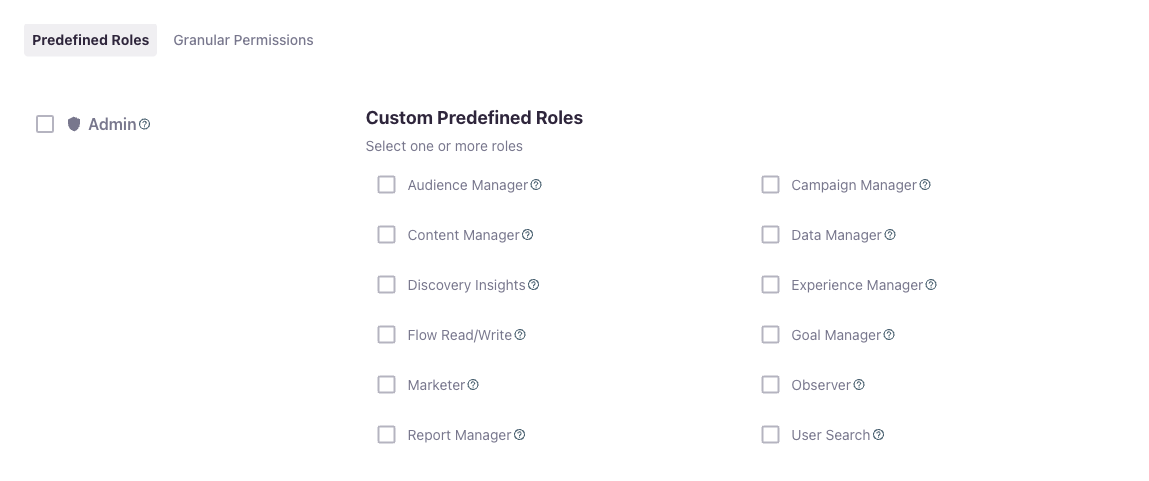
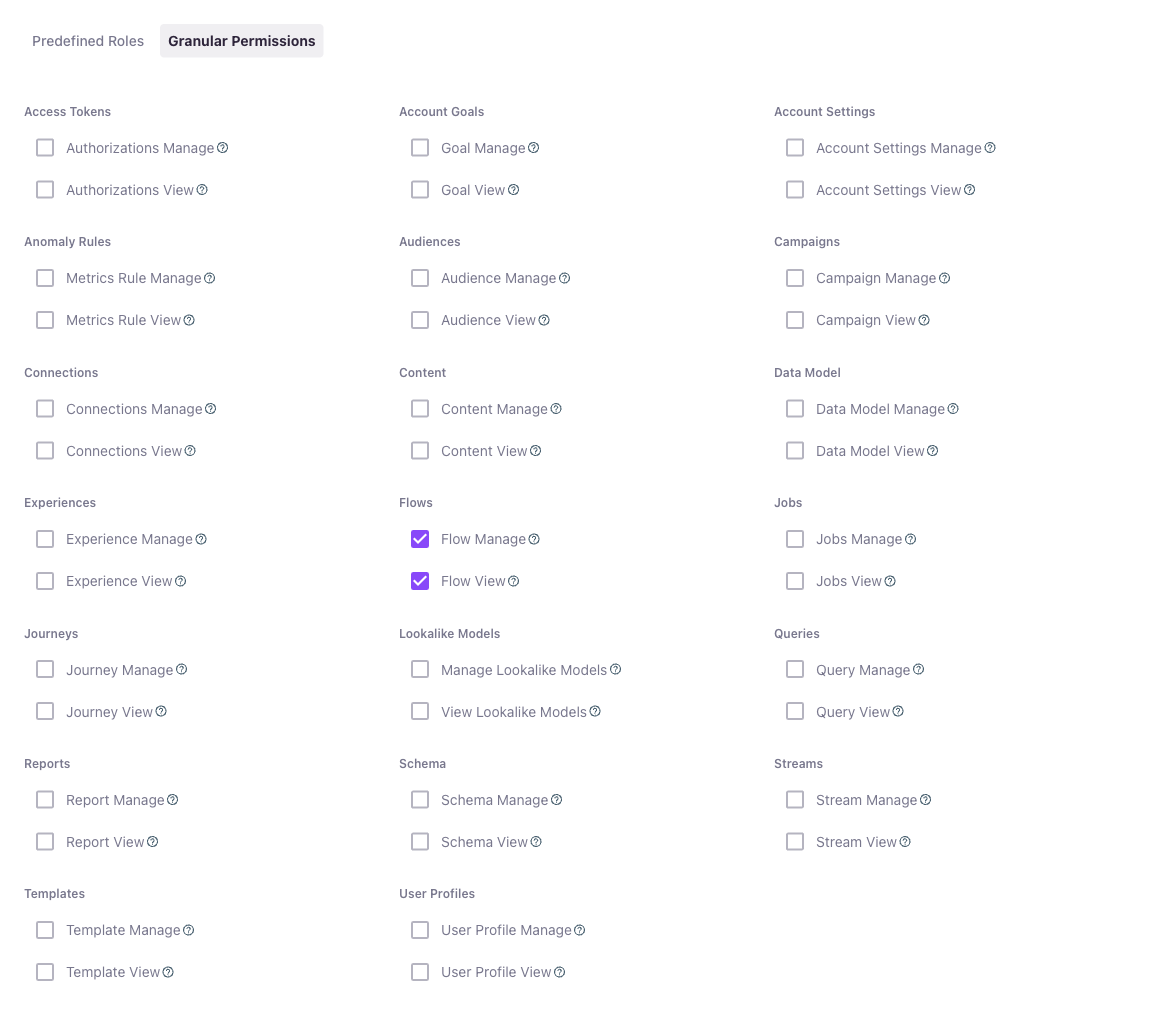
Roles from both tabs can be assigned to the same user. Permissions are additive across every assigned role.
A few rules to keep in mind when assigning roles:
- Additive across all roles. A user gets the union of permissions from every assigned role. There is no subtractive or "deny" rule that one role can apply over another.
Manage includes View. Assigning both the view and manage role for the same area is redundant. Just assign the manage role.- Predefined and granular can be combined. A user can hold predefined roles and granular permissions at the same time. Where they overlap, the broader access wins.
- Account-scoped. Every role applies within a single Lytics account. A user with access to multiple accounts has a separate set of role assignments in each one.
- No per-resource control. Roles gate access to a feature area as a whole, for example all segments or no segments. You cannot restrict a user to a single segment, schema table, or flow.
The catalog below mirrors the cards on the Granular Permissions tab. Each row lists the slug used in API calls and SSO group assertions, the display name as it appears in the UI, and what the permission grants.
In the role picker the cards are arranged into domain columns (such as Streams, Jobs, User Profiles, and Cloud Connect) to group related areas together. The Cloud Connect column holds the Connections and Data Model cards. The column a card appears in is purely an organizational aid in the UI — the slug and what it grants are unchanged.
| Slug | Display Name | Grants |
|---|
v2_auth_view | Authorizations View | Read access to authorizations. |
v2_auth_manage | Authorizations Manage | Read and write access to authorizations, including credential management. |
| Slug | Display Name | Grants |
|---|
v2_goal_view | Goal View | Read access to account goals. |
v2_goal_manage | Goal Manage | Read and write access to account goals. |
| Slug | Display Name | Grants |
|---|
v2_account_settings_view | Account Settings View | Read access to account settings, including the private fields list. |
v2_account_settings_manage | Account Settings Manage | Read and write access to account settings. |
| Slug | Display Name | Grants |
|---|
v2_anomaly_rule_view | Metrics Rule View | Read access to metrics rules (also referred to as anomaly rules in the API). |
v2_anomaly_rule_manage | Metrics Rule Manage | Read and write access to metrics rules. |
| Slug | Display Name | Grants |
|---|
v2_segment_view | Audience View | Read access to audiences. |
v2_segment_manage | Audience Manage | Read and write access to audiences. |
| Slug | Display Name | Grants |
|---|
v2_campaign_view | Campaign View | Read access to campaigns and programs. |
v2_campaign_manage | Campaign Manage | Read and write access to campaigns and programs. |
| Slug | Display Name | Grants |
|---|
v2_connections_view | Connections View | Read access to connections. |
v2_connections_manage | Connections Manage | Read and write access to connections. Authorizations remain view-only under this permission, so pair it with Authorizations Manage if needed. |
| Slug | Display Name | Grants |
|---|
v2_content_view | Content View | Read access to content documents and content classifications. |
v2_content_manage | Content Manage | Read and write access to content documents and classifications, including blocklists. |
| Slug | Display Name | Grants |
|---|
v2_data_model_view | Data Model View | Read access to the data model. |
v2_data_model_manage | Data Model Manage | Read and write access to the data model, including CloudConnect sync configuration. |
| Slug | Display Name | Grants |
|---|
v2_experience_view | Experience View | Read access to experiences. |
v2_experience_manage | Experience Manage | Read and write access to experiences. |
| Slug | Display Name | Grants |
|---|
v2_flow_view | Flow View | Read-only access to flows and the work and workflow records they generate. The flow canvas opens in a view-only state: the node and edge editing affordances, the label field, and the publish and delete controls are all disabled. |
v2_flow_manage | Flow Manage | Read and write access to flows, covering creating, editing, and deleting them along with publishing changes from the canvas. |
| Slug | Display Name | Grants |
|---|
v2_jobs_view | Jobs View | Read access to jobs, work records, and workflow status. |
v2_jobs_manage | Jobs Manage | Read and write access to jobs, including pause and resume. |
| Slug | Display Name | Grants |
|---|
v2_journey_view | Journey View | Read access to journeys and stages. |
v2_journey_manage | Journey Manage | Read and write access to journeys and stages. |
| Slug | Display Name | Grants |
|---|
v2_lookalike_view | View Lookalike Models | Read access to lookalike models and the audiences they reference. |
v2_lookalike_manage | Manage Lookalike Models | Read and write access to lookalike models. |
| Slug | Display Name | Grants |
|---|
v2_pii_view | PII View | Read access to Personally Identifiable Information (PII) on data and user profiles. PII that the user is not granted is redacted server-side. There is no manage counterpart — this permission only unhides PII for reading. In the role picker this card is grouped under the User Profiles column. |
| Slug | Display Name | Grants |
|---|
v2_query_view | Query View | Read access to saved queries. |
v2_query_manage | Query Manage | Read and write access to saved queries. |
| Slug | Display Name | Grants |
|---|
v2_report_view | Report View | Read access to reports. |
v2_report_manage | Report Manage | Read and write access to reports. |
| Slug | Display Name | Grants |
|---|
v2_route_rule_view | Route Rule View | Read access to route rules. In the role picker this card is grouped under the Streams column. |
v2_route_rule_manage | Route Rule Manage | Read and write access to route rules, including creating, editing, duplicating, and deleting them. |
| Slug | Display Name | Grants |
|---|
v2_schema_view | Schema View | Read access to schema tables and field definitions. |
v2_schema_manage | Schema Manage | Read and write access to schema tables, fields, identity configuration, and rankings. |
| Slug | Display Name | Grants |
|---|
v2_stream_view | Stream View | Read access to data streams and their configuration. |
v2_stream_manage | Stream Manage | Read and write access to data streams. |
| Slug | Display Name | Grants |
|---|
v2_template_view | Template View | Read access to message and content templates. |
v2_template_manage | Template Manage | Read and write access to templates. |
| Slug | Display Name | Grants |
|---|
v2_user_profile_view | User Profile View | Read access to user profiles (entity records). |
v2_user_profile_manage | User Profile Manage | Read and write access to user profiles. |
| Slug | Display Name | Grants |
|---|
v2_workflow_rule_manage | Workflow Rule Manage | Read and write access to workflow rules, which include the destination filters applied to export jobs. There is no view counterpart — workflow rules have no separate read gate, so manage is the only role. Setting a destination filter on a specific authorization also requires a role that can see authorizations, such as v2_auth_view or v2_jobs_view. In the role picker this card is grouped under the Jobs column. |
Opt-in email notification preferences are not part of the Granular Permissions tab. They live in their own Notifications & Preferences card on the user summary page (see Managing Users). They do not grant access to any feature area on their own — they only control which emails the user receives.
Unlike predefined roles and granular permissions, these preferences can be toggled by the user on their own profile; an admin does not have to set them.
| Slug | Display Name | Grants |
|---|
job_alerts | Job Alerts | Receives email notifications about job lifecycle events (success, failure, completion). |
metrics_rule_alerts | Metrics Rule Alerts | Receives email notifications when a metrics rule fires. |
📘Granular permissions do not include the ability to invite new users or change other users' role assignments. A user who needs to manage other users must hold the Admin predefined role in addition to any granular permissions.
Some assemblies of granular permissions that come up often:
- Read-only auditor. Pair the view permissions for the areas you want them to inspect. A common combination is Audience View, Schema View, Jobs View, Connections View, and Report View.
- Audience-only marketer. Audience Manage plus Campaign View. The user can build and edit audiences and see how campaigns are using them, but cannot change campaigns themselves.
- Data engineer (no audience write). Schema Manage, Stream Manage, Jobs Manage, and Query Manage. The user owns the data pipeline but cannot publish audiences.
- Integration owner. Authorizations Manage, Connections Manage, and Jobs View. The user can stand up and maintain destinations and authorizations and watch the resulting export jobs run.
- Lookalike modeler. Manage Lookalike Models plus Audience View. The user can train and tune lookalike models against existing audiences without being able to edit them.
- On-call data operator. Jobs Manage, plus the Job Alerts and Metrics Rule Alerts preferences from the Notifications & Preferences card. The user can manage jobs and gets paged on the events they care about.
Predefined roles and granular permissions can be combined on the same user. A few notes:
- If a user has a predefined role that already covers an area (for example Marketer covering audiences and campaigns), adding the matching granular view permission is redundant.
- Adding Admin alongside any other roles always grants full access. Granular permissions do not constrain Admin.
- For predictable behavior, pick one model per user where possible. If the predefined roles do not fit, switch that user to granular permissions entirely rather than mixing.
To help move a user from the broad predefined model to least-privilege granular permissions, the Predefined Roles tab includes a Convert to granular permissions button. With one or more non-Admin predefined roles selected, clicking it will:
- Select the equivalent granular permissions for the access those predefined roles grant.
- Clear the predefined roles that were converted.
- Switch you to the Granular Permissions tab so you can review the result before saving.
The conversion is conservative and never escalates access. A granular permission is selected only when every permission it would grant is already granted by the predefined roles you converted. If a predefined role grants some access that no granular permission expresses exactly, that access is dropped and listed in a warning so you can decide how to handle it (for example, by keeping the predefined role or contacting Lytics about a custom role).
A few details:
- Admin is excluded. Admin grants everything, so it has no meaningful granular equivalent. The button is disabled when only Admin (or nothing) is selected, and Admin is left untouched when converting alongside other roles.
- Nothing is saved until you submit. The button only changes the selections in the form. Review the resulting granular permissions — and any dropped-access warning — and submit the form to apply them.
- Not available when editing your own user. To prevent users from changing their own access, the button is disabled when you are editing your own account.
Lytics supports custom roles defined at the account level. A custom role lets an account use a permission shape that the predefined and granular catalogs do not cover, for example a hand-picked combination of access that does not fit any built-in role.
🚧There is no in-app role editor. Customers who need a custom role should contact their Lytics representative or Lytics Support. Once provisioned, the custom role appears in the Manage Users interface alongside the built-in roles and can be assigned the same way.
A few boundaries to be aware of:
- No per-resource access. You cannot grant access to a single segment, schema table, flow, or any other individual resource. Permissions operate at the feature-area level.
- No workspace tier. All roles are scoped to a Lytics account. Lytics does not have a sub-account or workspace concept that roles can target.
- No time-bound assignments. A role assignment lasts until an admin removes it.
- No role inheritance. There is no parent-child hierarchy between roles.
- PII access is governed by the PII View permission and the private fields setting together. Which fields count as Personally Identifiable Information (PII) is controlled by the private fields account setting; whether a user can see those fields is granted by the PII View (
v2_pii_view) granular permission (or an equivalent predefined role). Without it, PII is redacted server-side regardless of the user's other permissions. PII View only unhides PII for reading — it does not grant write access to any feature area.
Roles are assigned the same way regardless of which tab they come from:
- From the Manage Users interface. Open Manage Users from the account menu, select the user, and choose roles from the Predefined Roles or Granular Permissions tab. Multiple roles can be selected across both tabs.
- Via SSO group assertions. If your account uses SSO, every slug listed in this catalog and in the Single Sign-On Overview works in the standard
lytics_<AID>_<role> group assertion format. For example, lytics_123_v2_segment_manage assigns the Audience Manage permission for account 123.
📘The Manage Users interface lists every user in the account and their assigned roles. For programmatic auditing, the User API returns the same information.

